Login
  • +1603-574-4786
  • ArkaHost WebMail
  • ArkaHost LiveChat
  • ArkaHost Support
Need Fast, Reliable Web Hosting? Hosttouch.com Hosting Is The Leader In Optimized Hosting For Any Need! Try Our Website Hosting Service Today!, Ecommerce Hosting – HostTouch.com | WebHosting / Domain Registration, Cheap Web Hosting India, Web Hosting UAE Dubai, Web Hosting India, Web Hosting UAE Dubai-Web Hosting Company Noida Dubai NCR India-Web Hosting Companies, Web Hosting Services, Reseller Hosting, and Dedicated Servers by Host, HostTouch.com
Menu
  • Hi ! Business
      • Business Industry

      • Travel Industry
      • Advertising Industry
      • Agriculture Industry
      • Communication Industry
      • Construction Industry
      • Creative Industry
      • Education Industry
      • Entertainment Industry
      • Farming Industry
      • Popular Industry

      • Food Industry
      • Fashion Industry
      • Finance Industry
      • Green Industry
      • Heavy Industry
      • Hospitality Industry
      • Information Industry
      • Information Technology
      • Infrastructure Industry
      • Top 8 Industry

      • Shopping Industry
      • IT Industry
      • Light Industry
      • Manufacturing Industry
      • Materials Industry
      • Media Industry
      • Music Industry
      • Primary Industry
      • Publishing Industry
      • Hot Industry

      • Business Industry
      • Retail Industry
      • Robotics Industry
      • Secondary Industry
      • Service Industry
      • Space Industry
      • Technology Industry
      • Telecom Industry
      • Tertiary Industry
  • Hosting
    • Register Domains Book Domains In Best Prices
      Domains Transfer Transfer Domains & 1 Year Free
      Buy & Sell Domains Buy & Sell Domain Marketplace
      Premium Domains Earn Money By Premium Domains
      Shared Hosting Web sites versions the years
      Reseller Hosting Web sites versions the years
      Cloud Hosting Web sites versions the years
      Business Hosting Best Business Hosting Plans
      VPS Hosting Web sites versions the years
      WordPress Hosting Web sites versions the years
      Dedicated Hosting Web sites versions the years
      eCommerce Hosting Buy & Sell eCommerce Business
  • WordPress
      • WP Hosting

      • Blog WP Hosting
      • Personal WP Hosting
      • News Editorial Hosting
      • Creative Hosting
      • Portfolio Hosting
      • Photography Hosting
      • Art Hosting
      • Experimental Hosting
      • eCommerce Hosting
      • Business WP

      • Corporate Hosting
      • Business Hosting
      • Directory Hosting
      • Marketing Hosting
      • Wedding Hosting
      • Miscellaneous Hosting
      • Mobile Hosting
      • BuddyPress Hosting
      • Film & TV Hosting
      • eCommerce WP

      • Retail Hosting
      • Fashion Hosting
      • Health & Beauty Hosting
      • Shopping Hosting
      • Travel Hosting
      • Food Hosting
      • Children Hosting
      • Woocommerce Hosting
      • Nonprofit Hosting
      • Technology WP

      • Technology Hosting
      • Hosting Wordpress
      • Software Hosting
      • Real Estate Hosting
      • Education Hosting
      • Entertainment Hosting
      • Restaurants Hosting
      • Events Hosting
      • Cafes Hosting
  • Scripts
      • TOP 10 SCRIPTS

      • Accounting Software
      • Banking Software
      • Bundle Package
      • Classified Script
      • CRM Application
      • Directory Script
      • Ecommerce Website
      • Educational Software
      • Enterprise Application
      • Hospital Software
      • HOT SCRIPTS

      • Hotel Booking Script
      • HRMS Application
      • Jobportal Script
      • Marketplace Website
      • Matrimonial Script
      • MLM Application
      • Mobile Apps
      • Online Booking Script
      • Travel Script
      • Realestate Script
      • TRENDING SCRIPTS

      • Restaurant Management
      • Retail Management
      • Vehicle Tracking System
      • Food Ordering Script
      • Taxi Booking App
      • Online Course Script
      • Crowdfunding Script
      • Job Portal Script
      • Classified Ads Script
      • Support Ticket System
      • POPULAR SCRIPTS

      • Grocery PHP Script
      • Equipment Rental System
      • Logistic Marketplace
      • Teacher Marketplace
      • Freelancer Clone
      • Job Board Software
      • PHP Forum Script
      • Property Rental
      • Service Marketplace
      • Fiverr Clone Script
  • Apps

Tag Archives:change author of a post in wordpress - Hosttouch.com

Home / Blog / Tag: change author of a post in wordpress
How to Change the Author of a Post in WordPress

How to Change the Author of a Post in WordPress

  • 06 October 2021
  • in: Beginners Guide
  • Tags: change author of a post in wordpress, change post author, Do you want to change the author of a WordPress post? Learn how to easily change the author of individual posts in WordPress. (Update: Bulk method added), wordpress post author

Do you want to change the author of a post in WordPress?

Sometimes you may need to change a post to a different author than the user who first uploaded it. You can do this without having to copy and paste the post using a different account.

In this article, we’ll show you how to simply change the author of a post in WordPress with just a few clicks.
How to Change the Author of a Post in WordPress

Before You Change the Author of a WordPress Post

If you just want to show your own name on a post written by another user on your WordPress site, then you’re ready to follow the instructions in this article.

But, if you want to show a different user as the author, then you need to make sure this user exists on your WordPress site first. See our guide on how to add new users and authors in WordPress for detailed instructions.

You can view and manage all the users on your WordPress site by visiting the Users menu item when logged in with your WordPress administrator account.

View and Manage All the Users on Your WordPress Site

If you only want to change the way your name is displayed, then check out our guide on how to add or change your full name in WordPress.

Having said that, let’s look at how to quickly and easily change the author of a post in WordPress. There are a few ways to do this, so use the links below to jump to the method you want to use.

  • How to Change the Author From the Block Editor
  • How to Change the Author from the Classic Editor
  • How to Change the Author from Quick Edit
  • How to Change the Author of Multiple WordPress Posts

How to Change the Author From the Block Editor

If you use the Gutenberg block editor, then you first need to open the post or page where you want to change the author name. On the post edit screen, you need to make sure Post is selected in the right-hand sidebar.
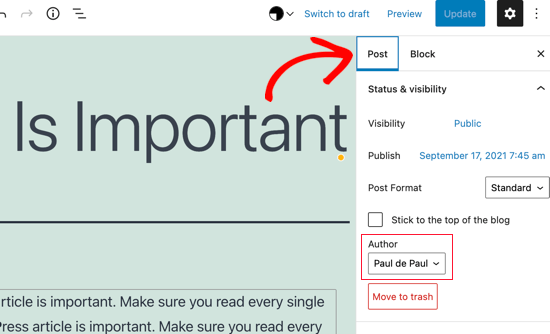
Make Sure Post Is Selected

Then, locate Author under the ‘Status & Visibility’ section and you’ll see a list of available authors to choose from. You need to select the new author name from the drop down menu.
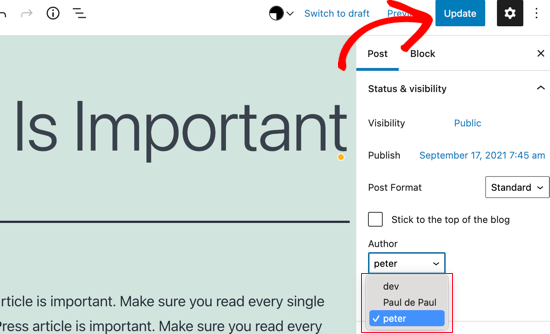
Select the New Author Name from the List

Once you’ve done that, make sure you click ‘Update’ or ‘Save Draft’ to save your changes.

That’s it, you have successfully changed the author of a post in the Gutenberg block editor.

How to Change the Author from the Classic Editor

If you’re using the classic WordPress editor, then simply open the post or page where you want to change the author name. You will likely not see the author panel in the editor, especially if you recently started your WordPress blog.

You will need to click on the Screen Options button at the top right corner of the screen. This will show you a menu with several options that you can show or hide on your post edit screen.

Go ahead and click on the checkbox next to the Author option.
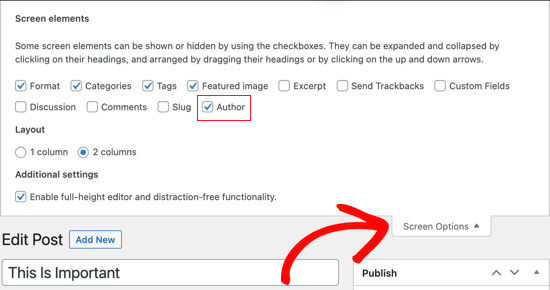
Click the Checkbox Next to Author

The author panel should now be visible on the screen. You need to click on the current author’s name and then you will see a list of available authors to choose from.
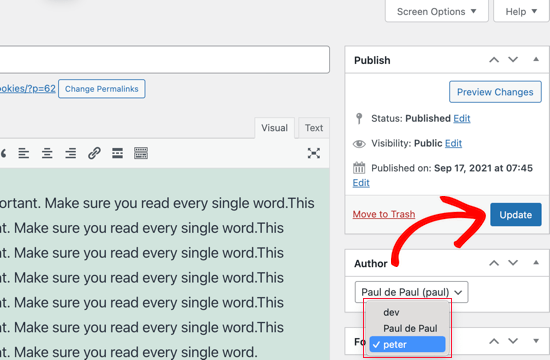
List of Authors

Once you have chosen a new author, make sure you click ‘Update’ or ‘Save Draft’ to save your changes.

Congratulations, you have successfully changed the author of a post in the classic editor.

How to Change the Author from Quick Edit

You can also quickly change the author of a post from the Quick Edit screen while viewing all posts from the Posts » All Posts page.

First, should hover your mouse over the post you wish to change and a menu should appear. Now you need to click the Quick Edit link.
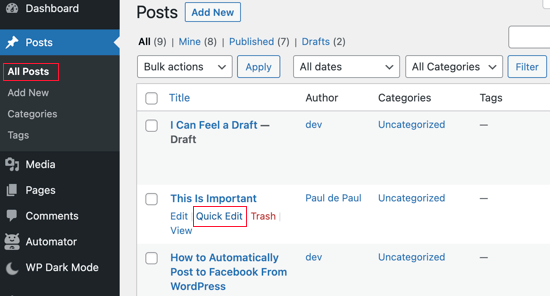
Click the Quick Edit Link

The Quick Edit metabox will now be displayed. You’ll need to click on the current author’s name and select a new author from the list. After that, you should click the Update button to save your changes.
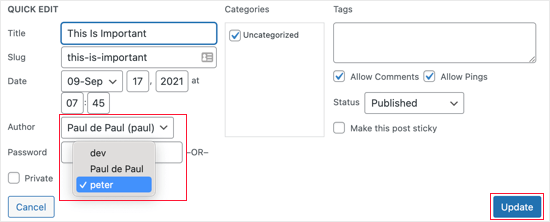
Select a New Author from the List

Well done, you have changed the post’s author using Quick Edit.

How to Change the Author of Multiple WordPress Posts

Changing the author for multiple posts using the methods above would take a lot of time. Luckily, there’s an easier way to quickly change the author for multiple WordPress posts at once.

To bulk update authors, you should first navigate to the Posts » All Posts page. This will list all the posts on your WordPress site.

By default, WordPress shows 20 posts per page. If you want to display more posts, then you need to click on Screen Options and change the number of posts you want to display.
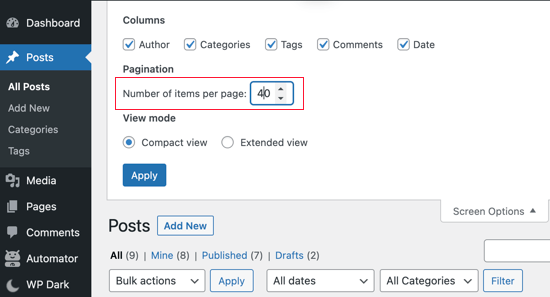
Show 40 Posts Per Page in WordPress

Now you need to select the posts where you want to change the author.

After selecting the posts, you should select Edit from the ‘Bulk Actions’ dropdown menu and then click the Apply button.
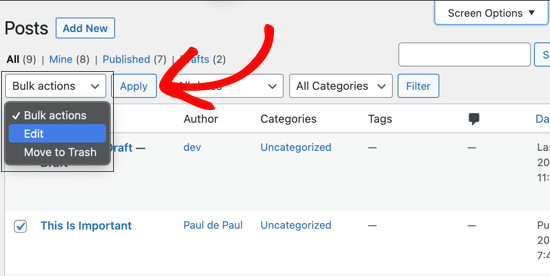
Select Edit from Bulk Actions

WordPress will now show you ‘Bulk Edit’ metabox. You need to select the new author by clicking on the dropdown menu next to the Author option.
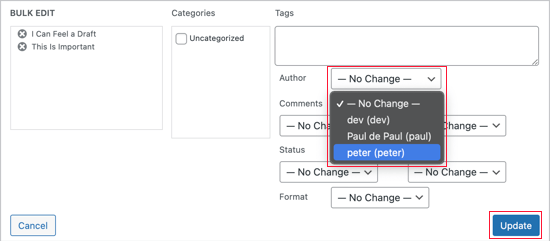
Click the Drop Down Menu Next to Author

Don’t forget to click on the Update button to save your changes.

That’s it, you have successfully changed the author for multiple WordPress posts without editing them individually.

How to Optimize Your Author Profiles for SEO

Finally, you may want to optimize your author profile pages to improve your SEO rankings. The author profile is what appears at the bottom of blog posts published under your name.
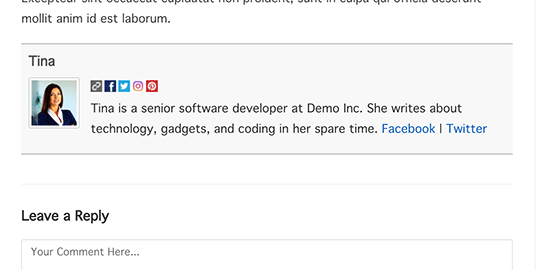
Author info box plugin preview

Here you can add a brief bio, links, and even your social media profiles.

By showcasing your author bio, you can build more credibility and give your readers a chance to learn more about you and the authors on your site.

WordPress allows you to add a brief author bio, but to add social media links you’ll need to use a WordPress author bio plugin.

Aside from that, you’ll also want to improve your Author archive pages where WordPress displays a list of posts written by that author.

To optimize author pages for SEO, we recommend using All in One SEO. It’s the best SEO plugin for WordPress used by over 2 million websites. For more details, see our guide on how to install a WordPress plugin.

Upon activation, simply navigate to Users » Profile to edit your author profile. Next, scroll down to the ‘All in One SEO Pro’ section where you can add links to your Facebook and Twitter profiles and create an author bio.
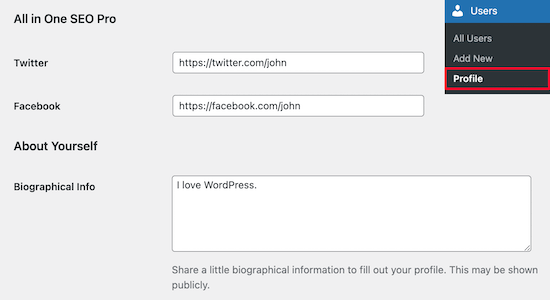
Author profile SEO

Once you’ve made the necessary changes, make sure you click ‘Update Profile’ at the bottom of the page.

Site Categories

  • Beginners Guide (27)
  • Child Category (1)
  • Entertainment (1)
  • Make Money Online (2)
  • New Technologies (4)
  • Our Portfolio (1)
  • Social Media (2)
  • Web Designs (2)
  • Web Tutorials (3)
  • Popular
  • Recent
  • Tags
  • Making this the first true generator on the internet Making this the first… May 6, 2019
  • How Much Does it Cost to Start a Membership Site? (2021 Edition) How Much Does it… October 6, 2021
  • Com vs Net – What’s the Difference Between Domain Extensions Com vs Net –… October 6, 2021
  • WordPress Layout Terms Demystified (Quick Reference) WordPress Layout Terms Demystified… October 6, 2021
  • How to Change the Author of a Post in WordPress How to Change the… October 6, 2021
  • 13 Crucial WordPress Maintenance Tasks to Perform Regularly 13 Crucial WordPress Maintenance Tasks to Perform Regularly October 7, 2021
  • How to Submit Your Website to Search Engines (Beginner’s Guide) How to Submit Your Website to Search Engines (Beginner’s Guide) October 7, 2021
  • Beginner’s Guide: What is VoIP and How Does it Work? (Explained) Beginner’s Guide: What is VoIP and How Does it Work? (Explained) October 7, 2021
  • How to Export a WordPress Site (Beginner’s Guide) How to Export a WordPress Site (Beginner’s Guide) October 7, 2021
  • How to Add Keywords and Meta Descriptions in WordPress How to Add Keywords and Meta Descriptions in WordPress October 7, 2021
  • aloom (5)
  • king theme (4)
  • wordpress seo (2)
  • google search console (2)
  • blogroll (1)
  • blogging tips (1)
  • Want to give someone access to your WordPress admin? Learn how to add new users and authors to your WordPress site + bonus on how to sell memberships (1)
  • wordpress user roles (1)
  • add new user in wordpress (1)
  • add author in wordpress (1)
  • Want to better organize your WordPress content? Here's how to add categories and subcategories (child categories) to your WordPress site (1)
  • wordpress blogroll (1)
  • Do you want to display a blogroll on your WordPress blog? Learn how to easily add a blogroll in WordPress (no plugin required) (1)
  • video sitemap (1)
  • sitemap (1)
  • html sitemap (1)
  • Are you looking for easy to start website ideas to launch a side business this year? Here are the best website ideas for beginners and pros to start today (1)
  • website ideas (1)
  • start an online business (1)
  • start a website (1)
  • make money online (1)
  • wordpress usability (1)
  • how to use wordpress (1)
  • wordpress gdpr compliance (1)
  • wordpress cookies (1)

Site Advertisements

Post Calendar

December 2025
MTWTFSS
1234567
891011121314
15161718192021
22232425262728
293031 
« Oct    

WhatsApp | Call Us +1812-652-4554

+1603-574-4786

Sign up to Newsletter to get special offers


Hosting Packages

  • Web Hosting
  • Reseller Hosting
  • VPS Hosting
  • Dedicated Servers
  • Windows Hosting
  • Cloud Hosting
  • Linux Servers

Follow Us

Our Products

  • Website Builder
  • Web Design
  • Logo Design
  • Register Domains
  • Traffic Booster
  • Search Advertising
  • Email Marketing

Resources

  • How to Create a Website
  • How to Transfer a Website
  • Start a Web Hosting Business
  • How to Start a Blog

Company

  • About Us
  • Press & Media
  • News / Blogs
  • Careers
  • Awards & Reviews
  • Testimonials
  • Affiliate Program

Support

  • Product Support
  • Contact Us
  • Knowledge Base
  • Tutorials


7272 Mill St.,Statesville, NC 28625
Phone: +1603-574-4786
Mail: info@hosttouch.com
View Directions

 
Copyright © 2018 Hosttouch.com - All rights reserved.
Terms of Service | Privacy Policy | Site Map
Scroll